Tutorial 1: Basic Simulation#
This tutorial will help you with the basics of setting up and running a simulation with Jaxion. It describes the example: examples/soliton_gas_star
Jaxion is designed for astrophysical scale simulations of fuzzy dark matter. As such, it uses units of:
length [L] = kpc
velocity [V] = km/s
mass [M] = Msun
(unless otherwise specified).
All other units are derived from these base units; e.g., units of time are in [T] = [L]/[V] = kpc / (km/s) ~= 0.978 Gyr.
First, in your Python script or Jupyter notebook, import the Jaxion library:
import jaxion
It will also often be useful to import jax.numpy:
import jax.numpy as jnp
to set up initial conditions, which as JAX arrays.
By default, JAX runs in single-precision mode, which is sufficient for many Jaxion simulations. But if you’d like to run in double-precision mode, you can set:
jax.config.update("jax_enable_x64", True)
The basic steps are:
set simulation parameters
create the simulation object
set the initial conditions
run the simulation
Setting Simulation Parameters#
The simulation parameters are set in a Python dictionary. If nothing is specified, the default values will be used. The default values can be found on the Parameters page.
Let’s look at the parameters for the example problem in this tutorial:
params = {
    "physics": {
        "quantum": True,
        "gravity": True,
        "hydro": True,
        "particles": True,
    },
    "domain": {
        "box_size": 10.0,
        "resolution_base": 32,
        "resolution_multiplier": 2,
    },
    "time": {
        "start": 0.0,
        "end": 1.0,
        "safety_factor": 1.0
    },
    "output": {
        "path": f"./checkpoints",
        "num_checkpoints": 100,
        "save": True,
    },
    "quantum": {
        "m_22": 1.0,
    },
    "hydro": {
        "sound_speed": 40.0,
    },
    "particles": {
        "num_particles": 1,
        "particle_mass": 1.0e7
    },
}
In the "physics" section, we specify which physics modules to use.
We enable the modules for the quantum wavefunction, self-gravity, hydrodynamics, and (star) particles.
In the "domain" section, we set the size of the simulation box to 10 kpc,
with a base resolution of 32 grid cells per side,
and a resolution multiplier of 2 (meaning the effective resolution is 64 grid cells per side).
In the "time" section, we set the simulation to start at time 0.0 and end at time 1.0 (in code units (kpc / (km/s))).
The time step in a Jaxion simulation is, by default, the quantum kinetically-limited time step,
dt = (m_per_hbar / 6.0) * (dx * dx), which can be scaled by the safety_factor parameter (set to 1.0 by default).
In the "output" section, we specify the output path for saving simulation checkpoints,
the number of checkpoints to save (100), and enable saving.
In the "quantum" section, we set the fuzzy dark matter particle mass to m_22 = 1.0 (in units of 10^-22 eV).
In the "hydro" section, we set the sound speed of the isothermal gas to 40.0 km/s.
In the "particles" section, we specify that we want to include 1 star particle with a mass of 1.0e7 Msun.
Creating the Simulation Object#
The simulation object is created by passing the parameters dictionary to the Simulation class:
sim = jaxion.Simulation(params)
Setting Initial Conditions#
Next, we have to set the initial conditions for the simulation.
To see all fields that need to be set, we can print the keys of the simulation state:
print(sim.state.keys())
In this example, we need to set the initial conditions for the:
quantum wavefunction
sim.state["psi"](complex)gas density
sim.state["rho"]and velocitysim.state["vx"],sim.state["vy"],sim.state["vz"]star particle positions
sim.state["pos"]and velocitiessim.state["vel"]
The fields for the dark matter and gas are represented as JAX arrays, of dimension (N, N, N),
where N is the grid resolution, which can be obtained from sim.resolution.
The star particle positions and velocities are represented as JAX arrays of shape (num_particles, 3).
The simulation gridpoints may be obtained as xx, yy, zz = sim.grid,
which can be helpful for setting some types of initial conditions.
Similarly, the spectral grid can be obtained as kx, ky, kz = sim.kgrid.
In this example, we set the initial conditions as follows:
# Set initial conditions
M_soliton = 1.0e9  # mass of soliton (M_sun)
m_22 = sim.params["quantum"]["m_22"]
r_soliton = 2.2e8 * m_22**-2 / M_soliton  # in kpc
box_size = sim.params["domain"]["box_size"]
nx = sim.resolution

# add fuzzy dark matter
xx, yy, zz = sim.grid
r = jnp.sqrt(
    (xx - 0.5 * box_size) ** 2
    + (yy - 0.5 * box_size) ** 2
    + (zz - 0.5 * box_size) ** 2
)
sim.state["psi"] = (
    jnp.sqrt(
        1.9e7 * m_22**-2 * r_soliton**-4 / (1.0 + 0.091 * (r / r_soliton) ** 2) ** 8
    )
    + 0.0j
)

# add gas
frac_gas = 0.1
rho_gas = frac_gas * M_soliton / box_size**3
sim.state["rho"] = jnp.ones((nx, nx, nx)) * rho_gas
sim.state["vx"] = jnp.zeros((nx, nx, nx))
sim.state["vy"] = jnp.zeros((nx, nx, nx))
sim.state["vz"] = jnp.zeros((nx, nx, nx))

# add star
pos = jnp.array([[0.6 * box_size, 0.5 * box_size, 0.5 * box_size]])
vel = jnp.array([[0.0, 40.0, 0.0]])

sim.state["pos"] = pos
sim.state["vel"] = vel
Running the Simulation#
To run the simulation, simply call the run() method:
sim.run()
This will evolve the simulation from the start time to the end time specified in the parameters,
saving checkpoints at the specified intervals.
You can monitor the progress of the simulation through the console output.
Inside the checkpoints directory,
you will find the saved simulation states that can be loaded and analyzed later,
a copy of the parameters used (params.json),
and projected density field images (*.png files).
Result#
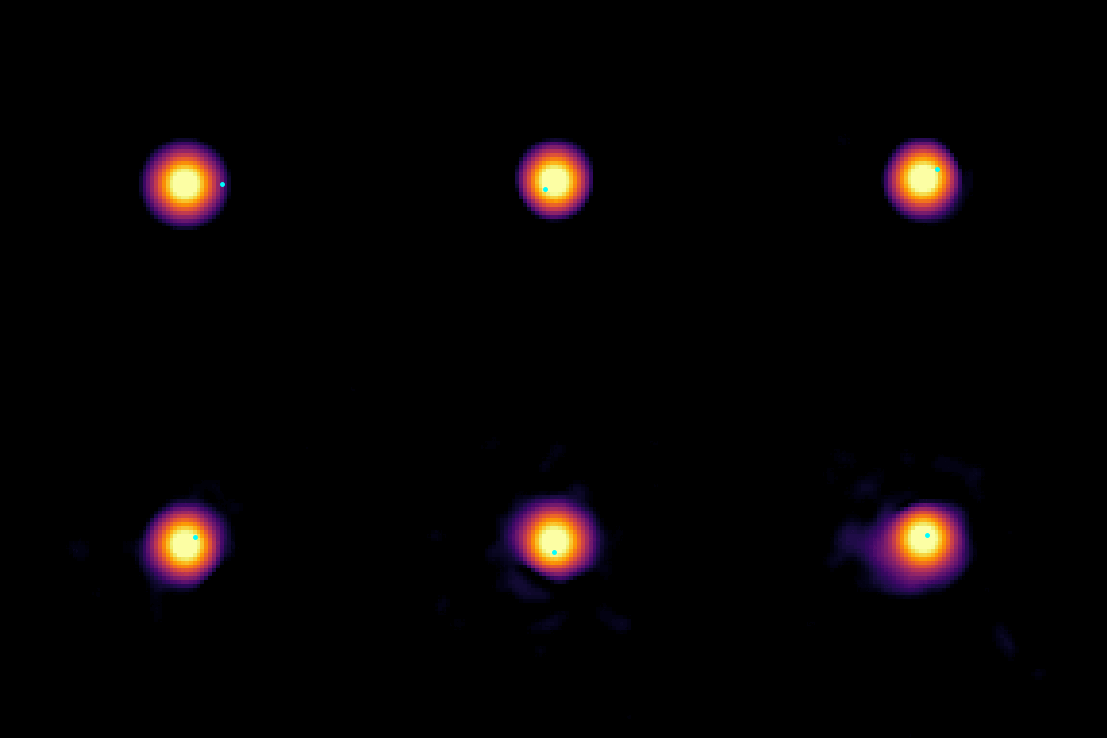
That’s it! You have successfully set up and run a basic simulation using Jaxion. It should look something like this: