
Quickstart#
To quickly try out Jaxion, install the package via pip:
pip install jaxion
If pip needs to build jaxdecomp from source, install the build prerequisites listed
on the Installation page first.
And run a simple example simulation (examples/soliton_binary_merger/soliton_binary_merger.py):
import jax
import jax.numpy as jnp
from jax.experimental import mesh_utils
from jax.sharding import Mesh, PartitionSpec, NamedSharding
import argparse
import os
import jaxion

# switch on for double precision
# jax.config.update("jax_enable_x64", True)

"""
Collide two solitons with opposite phases

Philip Mocz (2025)

Usage:
  python soliton_binary_merger.py --res <resolution_multiplier>

  python soliton_binary_merger.py --distributed --emulate
"""


def set_up_simulation(resolution_multiplier, sharding):
    # Parameters added/changed from default values
    params = {
        "domain": {
            "resolution_multiplier": resolution_multiplier,
        },
        "time": {
            "end": 1.0,
        },
        "output": {
            "path": f"./checkpoints{resolution_multiplier}/",
            "save": True,
        },
    }

    # Initialize the simulation
    sim = jaxion.Simulation(params, sharding=sharding)

    # Set initial conditions (two solitons)
    m_22 = sim.params["quantum"]["m_22"]
    box_size = sim.params["domain"]["box_size"]
    r_soliton = 0.02 * box_size
    xx, yy, zz = sim.grid

    def rho_soliton(r, r_soliton, m_22):
        return (
            1.9e7 * m_22**-2 * r_soliton**-4 / (1.0 + 0.091 * (r / r_soliton) ** 2) ** 8
        )

    rho = 0.0
    r_soliton = 0.02 * box_size
    for i in range(2):
        x_soliton = (0.5 + 0.3 * (i - 0.5)) * box_size
        y_soliton = 0.5 * box_size
        z_soliton = 0.5 * box_size
        r = jnp.sqrt(
            (xx - x_soliton) ** 2 + (yy - y_soliton) ** 2 + (zz - z_soliton) ** 2
        )
        rho += rho_soliton(r, r_soliton, m_22)

    half = (xx - 0.5 * box_size) > 0
    sim.state["psi"] = jnp.array(jnp.sqrt(rho) + 0j) * (
        1.0 * half + -1.0 * (1.0 - half)
    )

    return sim


def main():
    parser = argparse.ArgumentParser()
    parser.add_argument("--res", type=int, default=1, help="Resolution multiplier")
    parser.add_argument(
        "--distributed", action="store_true", help="run in distributed mode"
    )
    parser.add_argument(
        "--emulate", action="store_true", help="emulate distributed mode on CPU"
    )
    args = parser.parse_args()

    if args.distributed:
        if args.emulate:
            flags = os.environ.get("XLA_FLAGS", "")
            flags += " --xla_force_host_platform_device_count=8"  # change to, e.g., 8 for testing sharding virtually
            os.environ["CUDA_VISIBLE_DEVICES"] = ""
            os.environ["XLA_FLAGS"] = flags
            if jax.process_index() == 0:
                print("Using emulated distributed CPU mode")
        else:
            jax.distributed.initialize()
            if jax.process_index() == 0:
                print("Using distributed GPU mode")
        # Create mesh and sharding for distributed computation
        n_devices = jax.device_count()
        devices = mesh_utils.create_device_mesh((1, n_devices))
        mesh = Mesh(devices, axis_names=("x", "y"))
        sharding = NamedSharding(mesh, PartitionSpec("x", "y"))
    else:
        sharding = None

    sim = set_up_simulation(args.res, sharding)
    sim.run()

    return sim


if __name__ == "__main__":
    main()
with a resolution boost factor of 2 as:
python soliton_binary_merger.py --res=2
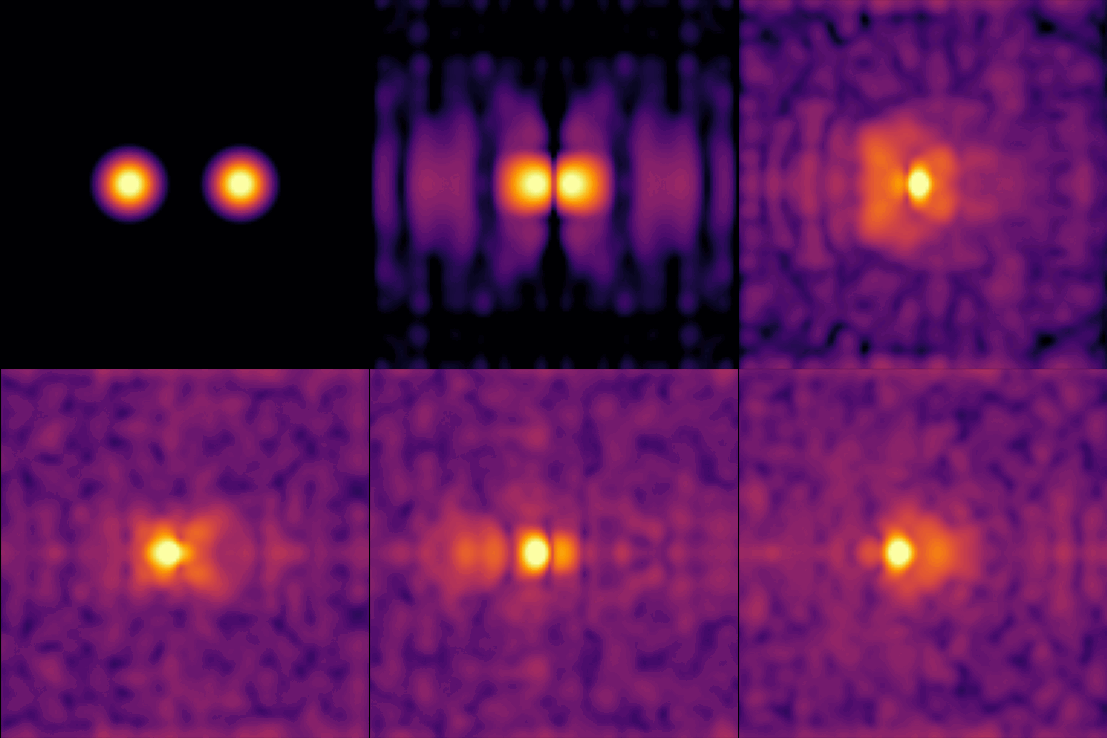
Running this should take under a minute and produce output (in checkpoints2/) that look something like:
You can also run the example in the cloud: Colab notebook.
For more info#
For info on how to install Jaxion with GPU support, see the Installation page.
For more examples of simulations, see the Examples page.